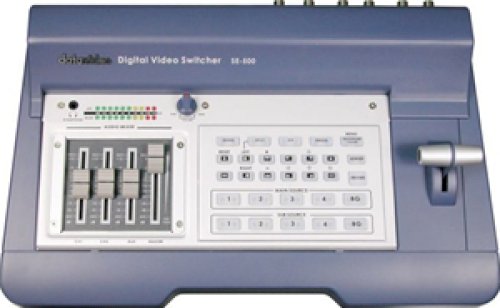
Datavideo SE500 Live Production 4 Channel Vision Mixer
With many years experience, and great success with the SE-800 Digital Vision Mixer, Datavideo is proud to introduce the SE-500, an analogue input, digital processing video switcher. The SE-500 includes 4 groups of video input (4 x composite and 4 x S-Video), 4 channels audio mixer, 2 microphone inputs, color correction, digital video transition effects, MIDI control interface, RS-232 remote control interface and many more professional features. Additionally, the SE-500 includes a truly unique feature Quad Preview. This preview output displays both tally light signals, and next video effects indicator. The operator can use one single monitor to observe four video input sources, camera activities, and video transition effects. The SE-500 has all the popular features of many more expensive mixers and it is extremely compact in size.
With the Datavideo DAC-6 (DV to Composite, Y/C, and Component converter), VP-314 (DV Repeater), and 10, 20, and 40 meter DV cables, you may use DV cameras to switch video up to 200 meter away.
No Genlock Required
Dual Channel Time Base Corrector and 4:2:2 frame synchronizer built in. There is no need to run external sync to this switcher.
In schools, outdoor activities, seminars, small studios, clubs, pubs etc, one single camera isn't enough to capture the action. In school productions for example, two cameras are facing toward the stage and another camera is roving, to capture different angles and audience reaction. You need three cameras all together (commonly called three camera video production or a three camera shoot). A video switcher perfectly fits in with this scenario.
However, when everybody is talking about digital video right now; does that mean you need a digital video switcher? Is Analog equipment out of date? What about those S-VHS cameras, Betacam cameras, and Video 8 cameras? No more uses anymore? Should I throw them away? Off course not, in such activities, what the user actually needs is a high quality, simple to operate, multi input video switcher with an affordable price.
Key Features| Video Formats | Analogue S-Video (Y/C) and Composite PAL (NTSC is available as a different model) YUV at Sony Betacam Standard |
|---|---|
| Video Inputs (4 Max) | 4 x Composite 4 x S-Video (Y/C) |
| Video Output | Composite and S-Video YUV output (using the S-Video & Composite outputs) Quad Preview output (Composite) with Tally light indicator and next video effects indicator |
| Audio Inputs | 2 x Microphone (6.5mm Jack) 1 x Stereo Audio (RCA) Aux |
| Audio Output | Main output and headphone output with volume control |
| Dual Channel Full Frame Synchronizer TBC | 4:2:2, 13.5MHz |
| Digital Effects | A/B Dissolve PIP Quad Split Freeze Wipe Fade (Digital Effects with T-Bar manual control) |
| Headphone Monitor Jack | Stereo Audio, 1.0Wrms in 16ohms |
| RS232 Data Control Port for Remote Control | Yes |
| MIDI Control Interface | Yes |
| Colour Processing | Brightness: +/-30% Contrast: +3dB / -6dB Colour: +6dB / -10dB |
| Video Bandwidth | Component (YUV): > 4.8MHz S-Video (Y/C): > 4.8MHz Composite: > 4.8MHz Audio: 20Hz - 20kHz, +/-3dB |
| Signal/Noise Ratio (SNR) | Video: > 50dB Audio: > 70B |
| DG, DP | +/-3%, 3 degrees |
| Frame Delay | From Analogue in to Analogue Out: 1 Frame Delay |
| Audio THD | > 0.1% |
| Dimensions | 380x55x245mm (WxHxD) |
| Weight | 2.1kg |
| Power | Power Adaptor Input: AC 90-240v auto Power Adaptor Output: DC 12V 15W |
| Accessories | AC/DC Power Adaptor BNC cable x 2 S-Video (Y/C) cable x 2 Audio/Video Phono cables x 1 set Component (YUV) cable Instruction Manual |
Reviewed by 1 customer
Displaying review 1
Pros
- Compact Design
- Easy To Use
- Highly Compatible
- Improves Performance
- Lightweight
- Professional Quality
Cons
Best Uses
- Complex Projects
- In The Studio
Comments about Datavideo SE500 Live Production 4 Channel Vision Mixer:
Have installed 5 of these, they are low cost, professionally built that have all the main features of much more expensive units and are extremely simple to install. Bets of all you don't have to be a tech head to use one.
- Was this a gift?:
- No
Displaying review 1
Do you have questions about this product?
Get your Product questions answered by real customers and our in-house experts with the Videoguys AnswerBox!In this area, please only post questions specific to the product, i.e. operations, features, functions etc..
If you have questions about product availability, pricing, ordering, delivery, or other service issues, please call (03) 9543-8885 or use our Contact Centre to submit an email request.
Q:
We are trying to run 3 projectors for our church services.
Will this unit allow us to have 3 different images at any one time on each of the 3 screens?
i.e Song lyrics on main centre projector and animated video either side?
Thanks for your advice.Asked on 21/1/2013 by Mat from Gold Coast QLD1 answer
A:
No.. You would need a unit that has multiple video output to be able to route those images.Answered on 21/1/2013 by Michael from Videoguys
Q:
Can I connect a video capture device (elgato) to the vision mixer so i can capture both video and audio direct to my MAC?Asked on 29/7/2012 by Coco1 from London,UK1 answer
A:
I suppose so. As long as the input card has Composite in (720x576 PAL) then you should be fine..Answered on 29/7/2012 by Michael from Videoguys
Q:
Can I have 2 inputs giving PIP and use the Tbar only to switch to 2 other inputs PIP? If not what do I have to go to? If not can I switch with tbar fader to 2 inputs set before for PIP. The transition between 2 situations needs to be simple with only one movement of T bar.Asked on 8/12/2011 by Rick1 answer
A:
No.. you can only switch A to B or use any two imputs ant any one time.. You need two mixers in seriers to achive what you what to do. All you can do with this mixer is set one full screen, and one Picture in Picture, and switch the input.Answered on 8/12/2011 by Michael from Videoguys
Q:
What cable do i need to connect the mixer to a Sony HVR-HD1000 HDV Camcorder PAL at 20metresAsked on 12/10/2011 by lettie from Botswana1 answer
A:
You can either run Composite or S-Video. You will get better quality on S-video. Important to Note, that a high quality cable will be required to minimize any signal loseAnswered on 12/10/2011 by Michael from Videoguys
Q:
Dear sir,
Regarding the SE500 RS 232, is there a software package that comes with the unit?
Does it just do 4:3 aspect ratio or does it handle 16:9?
ThanksAsked on 2/8/2011 by Greg from Perth WA1 answer
A:
Yes, you can control the SE-500 via the RS-232 port using the RMC-150 software.. which is free and can be obtain by email us when you purchase the unit.
The SE-500 handles either 4:3 or 16:9.... you can't mix the two (i.e. there is no aspect ration converter built in... If you feeds in signals with his desired aspect ratio, all they need to do is ensure that they can monitor that aspect..... In other words, if they're feeding the unit 16:9, then they need to use 16:9 monitors for the display. If they want to use 4:3 then they need 4:3 monitors, or 16:9 monitors that are switchable to 4:3....Answered on 2/8/2011 by Michael from Videoguys


Follow Us On